

VS Code Copilot operates as an “AI Orchestrator” that bridges your local development environment with powerful large language models (LLMs). It doesn’t just “read” your code; it systematically assembles a grounded prompt—a package containing your code, intent, and project standards—to generate highly relevant responses. [1, 2, 3, 4, 5] Core Components & Architecture
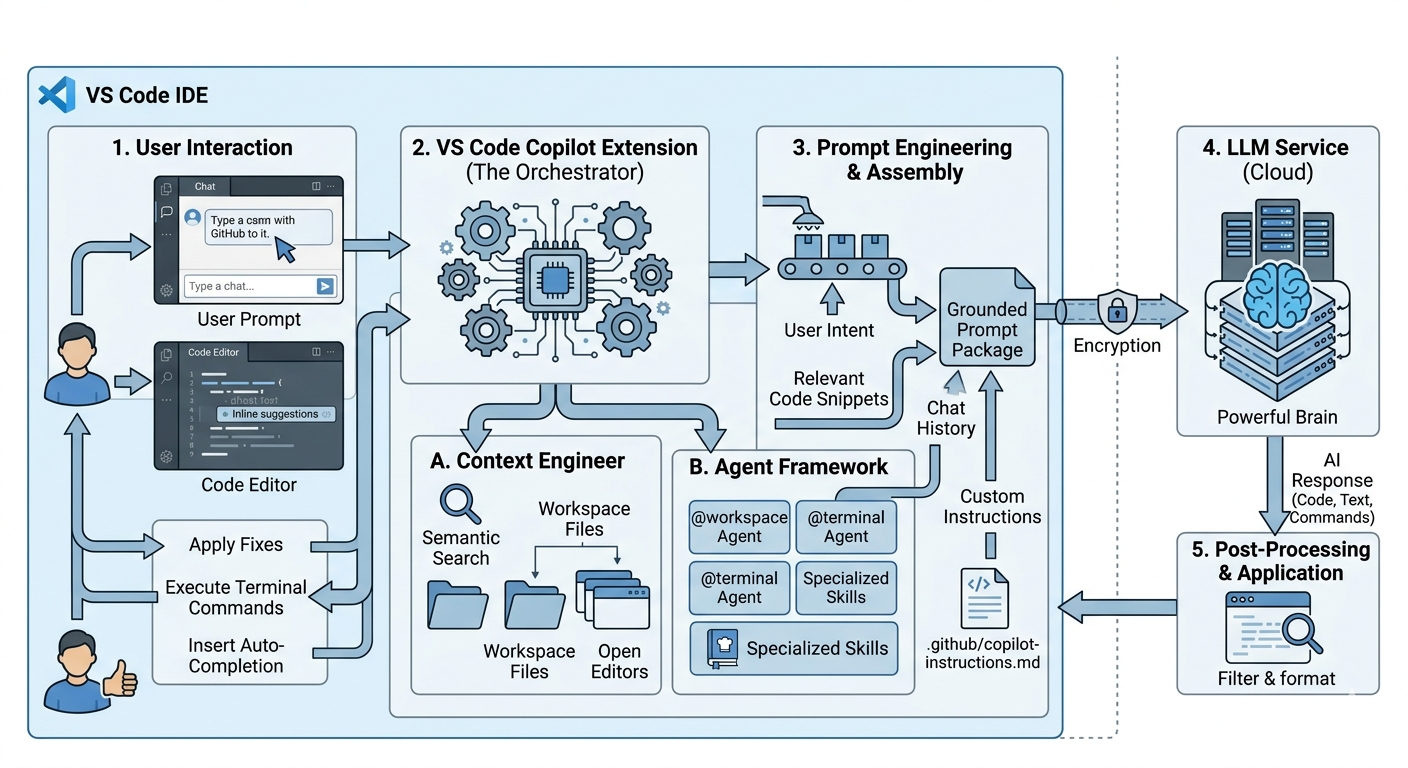
- The Orchestrator: The Copilot Extension acts as the heart, managing communication between your UI (chat, editor), local files, and the cloud-based AI.
- Context Engineering: Before sending a request, Copilot performs semantic search using vector embeddings to find relevant files across your workspace, ensuring the AI “sees” the right parts of your project.
- The Context Window: This is the total information the AI can “think” about at once. It includes your message, open files, chat history, and any #-mentions you’ve added. [1, 2, 6, 7, 8]
Skills & Agents Agents are autonomous units that can plan and implement complex features across multiple files. [6, 9]
- Agent Skills: These are “cookbooks” for the AI (typically a SKILL.md file) that define specific procedures, like how to write tests for your specific framework.
- Specialized Agents:
- @workspace: Understands your entire project structure.
- @terminal: Helps with command-line tasks and debugging shell errors.
- Plan Agent: Creates a structured step-by-step implementation plan before any code is written. [6, 10, 11, 12, 13]
Workflows & Prompts
- Autocomplete vs. Chat:
- Autocomplete is low-latency (under 200ms), focusing on the immediate line of code.
- Chat/Inline Edit handles higher-level logic and multi-file changes.
- Slash Commands: Quick shortcuts for common tasks, such as /tests to generate unit tests or /fix to propose a bug fix.
- Custom Instructions: You can define project-wide rules (e.g., “always use TypeScript”) in a copilot-instructions.md file within your .github folder. [12, 14, 15, 16, 17]
Internal Execution Flow
- User Input: You type a prompt or start coding.
- Context Gathering: Copilot gathers “signals” (open tabs, cursor position, relevant files via semantic search).
- Prompt Assembly: It combines your input + context + custom instructions into a single large prompt.
- LLM Processing: The prompt is sent to an AI model (like GPT-4o or Claude 3.5 Sonnet).
- Output & Action: The response is returned to VS Code, where it can be applied directly to files, executed in the terminal, or shown as a “diff” for review. [3, 7, 14, 18, 19]
[1] https://code.visualstudio.com [2] https://iitsnl.com [3] https://learn.microsoft.com [4] https://github.blog [5] https://epigra.com [6] https://code.visualstudio.com [7] https://learn.microsoft.com [8] https://code.visualstudio.com [9] https://code.visualstudio.com [10] https://www.youtube.com [11] https://code.visualstudio.com [12] https://code.visualstudio.com [13] https://code.visualstudio.com [14] https://www.youtube.com [15] https://www.youtube.com [16] https://www.youtube.com [17] https://code.visualstudio.com [18] https://docs.github.com [19] https://code.visualstudio.com